Sorry, there's no new blog post this week due to Friday being a teacher institute day. I'll be out at the ICE Conference in St. Charles, learning about fun new technology tools for the classroom! See you next week for the latest news from the art room!
Thanks for another great week!
- Mrs. L.

Showing posts with label technology. Show all posts
Showing posts with label technology. Show all posts

11.22.2013
This Week in Art! Nov. 18-22
6th Grade Art:
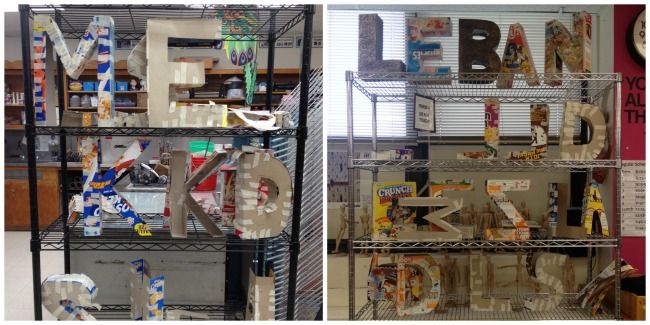
This week we worked on two different assignments. First, our sketchbook assignment: the one-point perspective name design, which was due on Thursday. Second, we began our 3-dimensional letter sculptures.
Our letter sculptures reinforce our block-letter drawing skills. We're building them out of old cereal boxes and masking tape. After our Thanksgiving break, we will begin applying paper mache to our forms! Can't wait!
7th Grade Art:
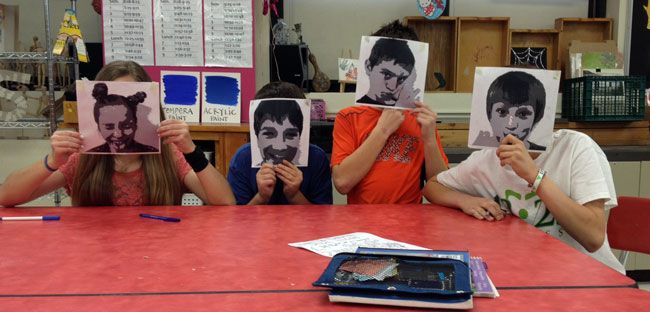
This was a very full week for us! We started off the week with some more work time on our surreal landscape sketchbook drawings. Then, we began our painting project - we took digital photos, and altered them on Adobe Photoshop to convert the image to four levels of value. Our printed out photos were then transferred onto paper for painting.
On Thursday, our first sketchbook assignment was due. Be sure to check your grade on Powerschool! We began our second sketchbook assignment right away: a black and white design inspired by Op Art!
8th Grade Art:
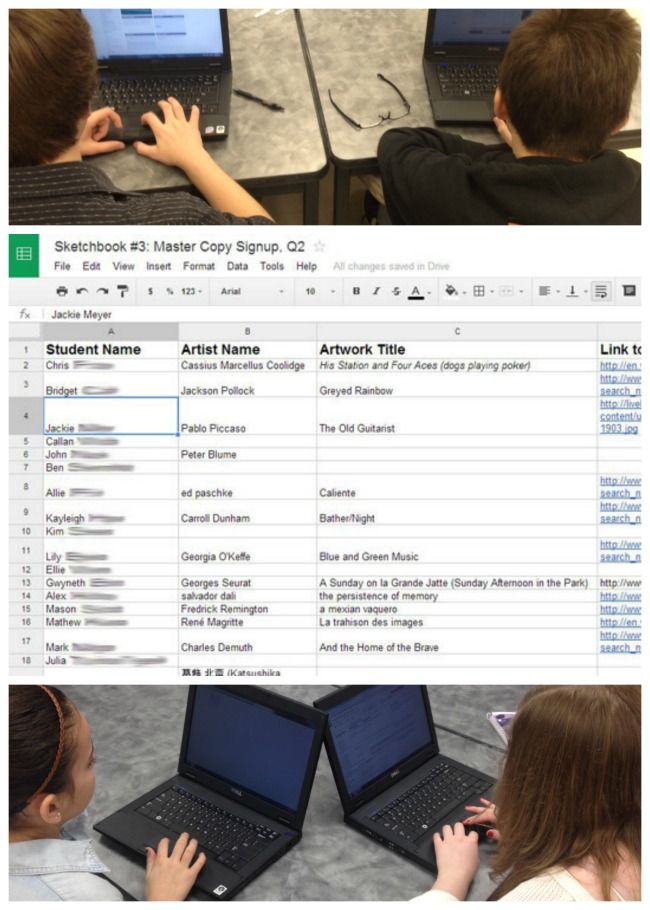
We spent most of this week working on our pixelated portraits assignment, but today we started our third sketchbook assignment. It is a copy of a famous painting. We researched artworks online via the links on the 8th grade art webpage. We then used a shared Google spreadsheet (via our d205 Google drive!) to "sign up" for our artwork, so that no one repeated a painting that was already claimed by someone else! It was super fun to get to try out our Google Apps logins for the first time, and see an entire class typing on one document at the same time! Amazing!
In other art news...
How did I miss this news story? Have you seen former President George W. Bush's paintings? Apparently, it's his hobby! He seems to enjoy painting portraits of dogs. It's pretty interesting! He was even on the Jay Leno show to talk about it, and presented Mr. Leno with a portrait! Art critic Jerry Saltz talks about the paintings in this article, and more on the Jay Leno appearance over here.
Thanks for another great week!
- Mrs. L.
This week we worked on two different assignments. First, our sketchbook assignment: the one-point perspective name design, which was due on Thursday. Second, we began our 3-dimensional letter sculptures.
Our letter sculptures reinforce our block-letter drawing skills. We're building them out of old cereal boxes and masking tape. After our Thanksgiving break, we will begin applying paper mache to our forms! Can't wait!
7th Grade Art:
This was a very full week for us! We started off the week with some more work time on our surreal landscape sketchbook drawings. Then, we began our painting project - we took digital photos, and altered them on Adobe Photoshop to convert the image to four levels of value. Our printed out photos were then transferred onto paper for painting.
On Thursday, our first sketchbook assignment was due. Be sure to check your grade on Powerschool! We began our second sketchbook assignment right away: a black and white design inspired by Op Art!
8th Grade Art:
We spent most of this week working on our pixelated portraits assignment, but today we started our third sketchbook assignment. It is a copy of a famous painting. We researched artworks online via the links on the 8th grade art webpage. We then used a shared Google spreadsheet (via our d205 Google drive!) to "sign up" for our artwork, so that no one repeated a painting that was already claimed by someone else! It was super fun to get to try out our Google Apps logins for the first time, and see an entire class typing on one document at the same time! Amazing!
In other art news...
How did I miss this news story? Have you seen former President George W. Bush's paintings? Apparently, it's his hobby! He seems to enjoy painting portraits of dogs. It's pretty interesting! He was even on the Jay Leno show to talk about it, and presented Mr. Leno with a portrait! Art critic Jerry Saltz talks about the paintings in this article, and more on the Jay Leno appearance over here.
Thanks for another great week!
- Mrs. L.
4.26.2013
This week in art! April 22-26
6th Grade:
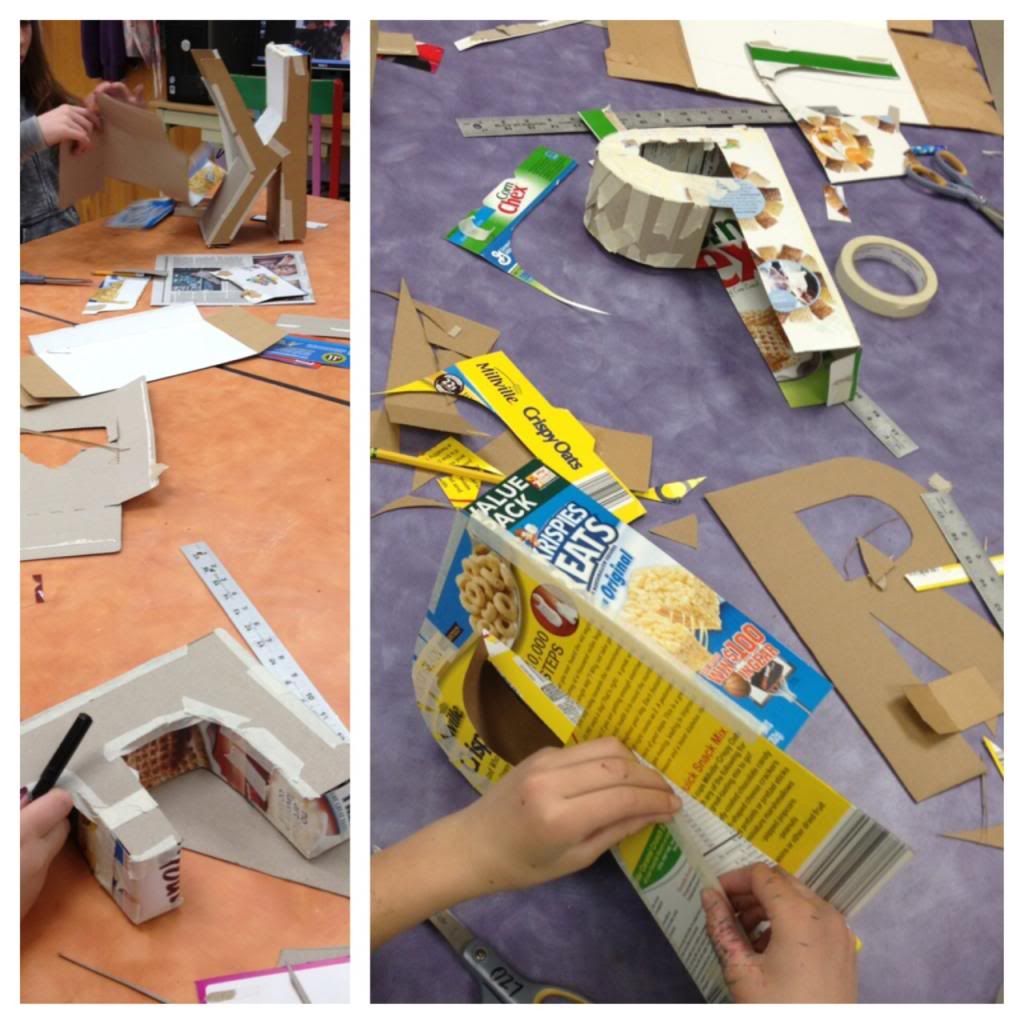
This week, we began our letter sculpture project! It was a good thing we learned all about block letters in our first drawing assignment, because we used this knowledge to draw our large letters for our sculptures! Cereal box cardboard is used to make the basic letter form, which is stuffed with newspaper and taped together with masking tape (how appropriate that our recycled materials project fell right around Earth Day!).
On Friday, our first sketchbook assignment (the one-point perspective name design) was due. We also pulled out the paper mache buckets and began coating our letterforms! We'll continue building our sculptures into next week.
7th Grade:
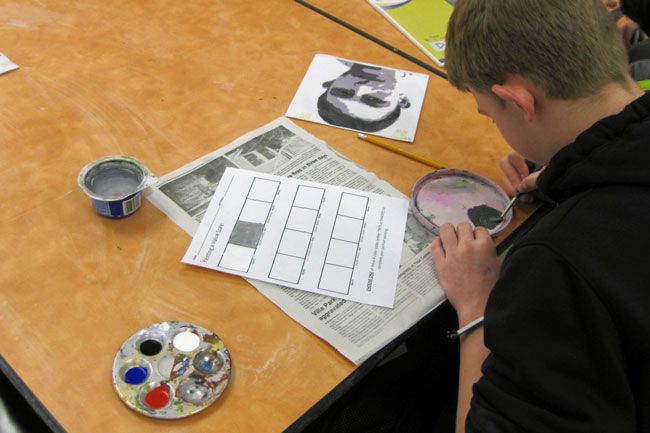
This week was the start of our painting unit. Students altered digital photos of themselves using Adobe Photoshop Elements software to create 4-levels of value on their image. The image outlines are transferred onto white paper to be painted. Before we begin our final paintings, we complete a value scale worksheet that allows us to practice mixing paint tints and shades, and also lets us try out three different color schemes so we can decide which one to use for our final portrait painting.
Our first sketchbook assignment (the two-point perspective surreal landscape) was due yesterday (Thursday). Be on the lookout for those grades to post soon on Powerschool, and for our artwork to be posted on Artsonia!
8th Grade:
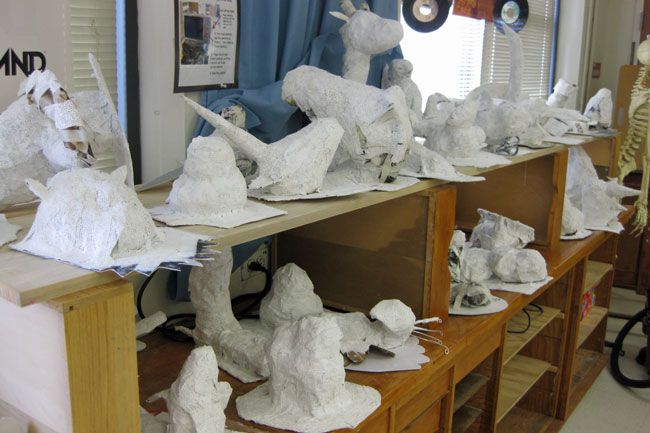
Wow! Check out how our awesome sculptures are coming along! We've been working hard this week. The first half of the week was spent finishing up our armatures for our plaster sculptures, and the second half was spent applying plaster! To top it off, we even turned in a sketchbook drawing assignment on Wednesday (our "master copy" drawing). Next week, we'll be finishing up the plaster application and starting a new sketchbook drawing assignment.
In other news...
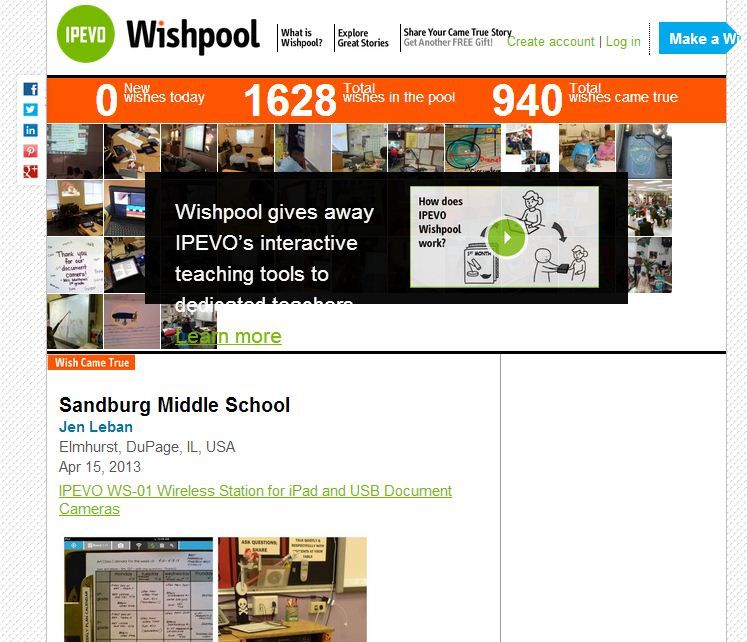
My "dream come true" story is on the front page of the iPEVO Wishpool site! I'm not sure how long it will be up for, so you can also view it via this direct link. The wireless station I won from them is really cool - I'm currently working on dreaming up fun ways to use it in the classroom with students!
Also in other fun news...
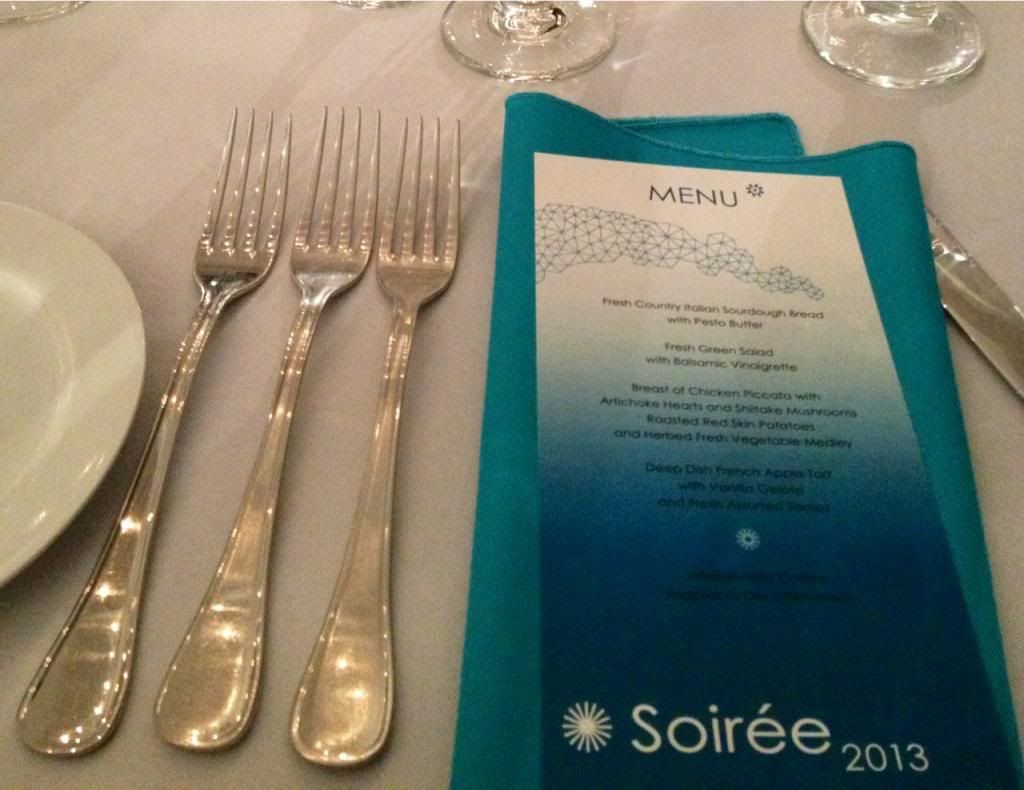
Last weekend, I was fortunate to attend the "Soiree 2013" event for the Elmhurst Art Museum! It's a super fancy fundraiser event for the museum, and Mercedes Benz of Westmont purchased an entire table for the Elmhurst art teachers so that we could attend. How cool! There was super yummy food from Cafe Amano, and amazing theatre performers and live music! I even had to get all dressed up to go! Yowza!
Thanks for another great week!
-Mrs. L.
This week, we began our letter sculpture project! It was a good thing we learned all about block letters in our first drawing assignment, because we used this knowledge to draw our large letters for our sculptures! Cereal box cardboard is used to make the basic letter form, which is stuffed with newspaper and taped together with masking tape (how appropriate that our recycled materials project fell right around Earth Day!).
On Friday, our first sketchbook assignment (the one-point perspective name design) was due. We also pulled out the paper mache buckets and began coating our letterforms! We'll continue building our sculptures into next week.
7th Grade:
This week was the start of our painting unit. Students altered digital photos of themselves using Adobe Photoshop Elements software to create 4-levels of value on their image. The image outlines are transferred onto white paper to be painted. Before we begin our final paintings, we complete a value scale worksheet that allows us to practice mixing paint tints and shades, and also lets us try out three different color schemes so we can decide which one to use for our final portrait painting.
Our first sketchbook assignment (the two-point perspective surreal landscape) was due yesterday (Thursday). Be on the lookout for those grades to post soon on Powerschool, and for our artwork to be posted on Artsonia!
8th Grade:
Wow! Check out how our awesome sculptures are coming along! We've been working hard this week. The first half of the week was spent finishing up our armatures for our plaster sculptures, and the second half was spent applying plaster! To top it off, we even turned in a sketchbook drawing assignment on Wednesday (our "master copy" drawing). Next week, we'll be finishing up the plaster application and starting a new sketchbook drawing assignment.
In other news...
My "dream come true" story is on the front page of the iPEVO Wishpool site! I'm not sure how long it will be up for, so you can also view it via this direct link. The wireless station I won from them is really cool - I'm currently working on dreaming up fun ways to use it in the classroom with students!
Also in other fun news...
Last weekend, I was fortunate to attend the "Soiree 2013" event for the Elmhurst Art Museum! It's a super fancy fundraiser event for the museum, and Mercedes Benz of Westmont purchased an entire table for the Elmhurst art teachers so that we could attend. How cool! There was super yummy food from Cafe Amano, and amazing theatre performers and live music! I even had to get all dressed up to go! Yowza!
Thanks for another great week!
-Mrs. L.
3.22.2013
This Week in Art: March 18-22
Next week is SPRING BREAK!!! Woo hoo!!! I think the teachers are just as excited as the students for this one! Enjoy your time off!
6th Grade Art:
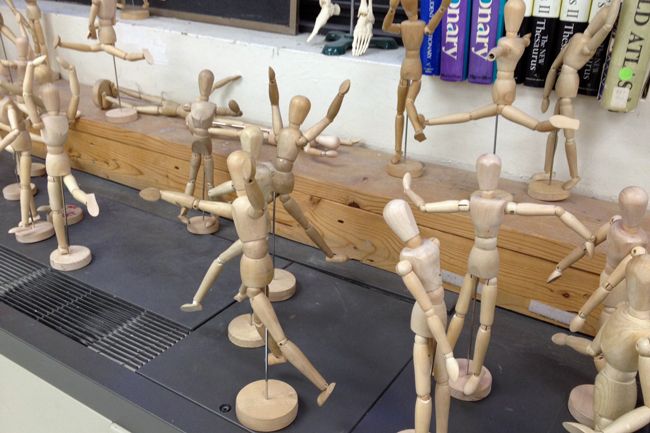
We finished up our letter sculptures this week, and we've started on our final sketchbook assignment, #3: a manikin drawing. Students love to pose and play with the manikins in the classroom, so for this assignment we finally get to use them! Students pose a wooden manikin in action, draw it, and write a sentence to describe what the manikin is doing. Our goal with this drawing is try to show movement and value - making the manikins look 3-D. This drawing will be due on Friday, April 5th.
7th Grade Art:
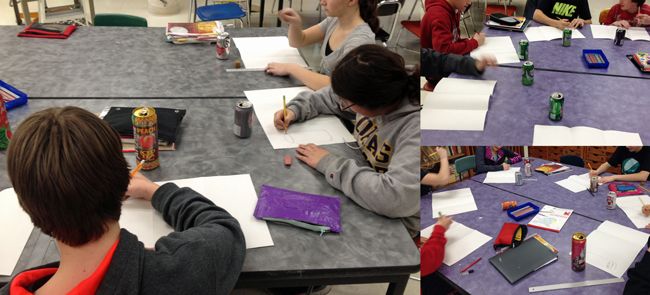
We started (what I think is) one of the most fun projects of 7th grade: "Evolution of an Aluminum Can!" Students bring in a canned beverage of their choice, and we get to drink it in class while we draw from observation. Once our first drawing (of the whole can) is finished, we partially crush the can and repeat the process. Once this second drawing is finished, we completely crush the can and draw it for a third time! It's fun to challenge our skills at looking at drawing from real life. This drawing is done in colored pencil (we even pull out the metallic sets for this!) and part of our unit on still life.
8th Grade Art:
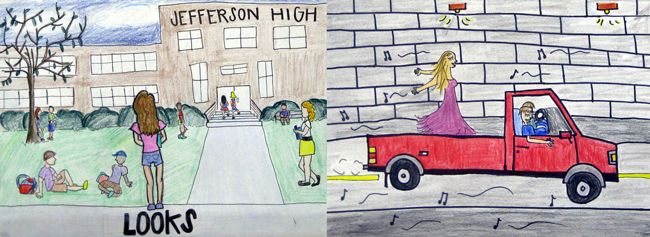
This week was the first week of quarter 4! Can you believe we're in the home stretch of this school year? Crazy! On Wednesday, we went to the library 8th period to work on sketchbook assignment #1: draw a scene from your favorite book. The library is the perfect place to find literary inspiration! Although the library was already reserved 9th period, many students still went down to check out books for their drawings during that class. We worked on these pictures Wednesday-Friday, so we'll be ready to start something new when we return from spring break! These drawings will be due on Friday, April 5th.
In other news...
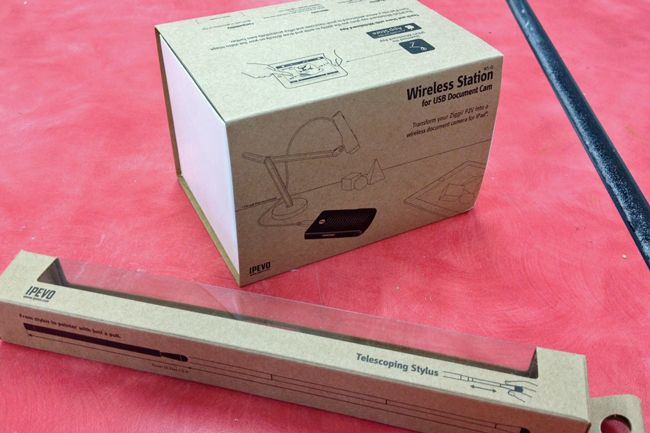
I won a wireless station for USB document cameras and iPads from the iPEVO Wishpool program! This is a great program, so be sure to share with any other teachers you know. Each month, a different item is listed that teachers can "wish" for by signing up and telling iPEVO how this item would be useful in their classroom. If your wish is selected, the item is sent directly to you at school! You may remember that I received three bluetooth keyboards and cases for the iPads through this program a couple months ago. I love iPEVO and all they do for schools!
Our wireless station (once installed; we have to wait until our tech department has some available time to help us) will allow us to view items on the document camera via our ipads - wirelessly! I can't wait to try it out - I think I might take it home to test out at my house over spring break! So fun!
Thanks for another great week!
-Mrs. L.
6th Grade Art:
We finished up our letter sculptures this week, and we've started on our final sketchbook assignment, #3: a manikin drawing. Students love to pose and play with the manikins in the classroom, so for this assignment we finally get to use them! Students pose a wooden manikin in action, draw it, and write a sentence to describe what the manikin is doing. Our goal with this drawing is try to show movement and value - making the manikins look 3-D. This drawing will be due on Friday, April 5th.
7th Grade Art:
We started (what I think is) one of the most fun projects of 7th grade: "Evolution of an Aluminum Can!" Students bring in a canned beverage of their choice, and we get to drink it in class while we draw from observation. Once our first drawing (of the whole can) is finished, we partially crush the can and repeat the process. Once this second drawing is finished, we completely crush the can and draw it for a third time! It's fun to challenge our skills at looking at drawing from real life. This drawing is done in colored pencil (we even pull out the metallic sets for this!) and part of our unit on still life.
8th Grade Art:
This week was the first week of quarter 4! Can you believe we're in the home stretch of this school year? Crazy! On Wednesday, we went to the library 8th period to work on sketchbook assignment #1: draw a scene from your favorite book. The library is the perfect place to find literary inspiration! Although the library was already reserved 9th period, many students still went down to check out books for their drawings during that class. We worked on these pictures Wednesday-Friday, so we'll be ready to start something new when we return from spring break! These drawings will be due on Friday, April 5th.
In other news...
I won a wireless station for USB document cameras and iPads from the iPEVO Wishpool program! This is a great program, so be sure to share with any other teachers you know. Each month, a different item is listed that teachers can "wish" for by signing up and telling iPEVO how this item would be useful in their classroom. If your wish is selected, the item is sent directly to you at school! You may remember that I received three bluetooth keyboards and cases for the iPads through this program a couple months ago. I love iPEVO and all they do for schools!
Our wireless station (once installed; we have to wait until our tech department has some available time to help us) will allow us to view items on the document camera via our ipads - wirelessly! I can't wait to try it out - I think I might take it home to test out at my house over spring break! So fun!
Thanks for another great week!
-Mrs. L.
9.21.2011
Masterpiece Me!
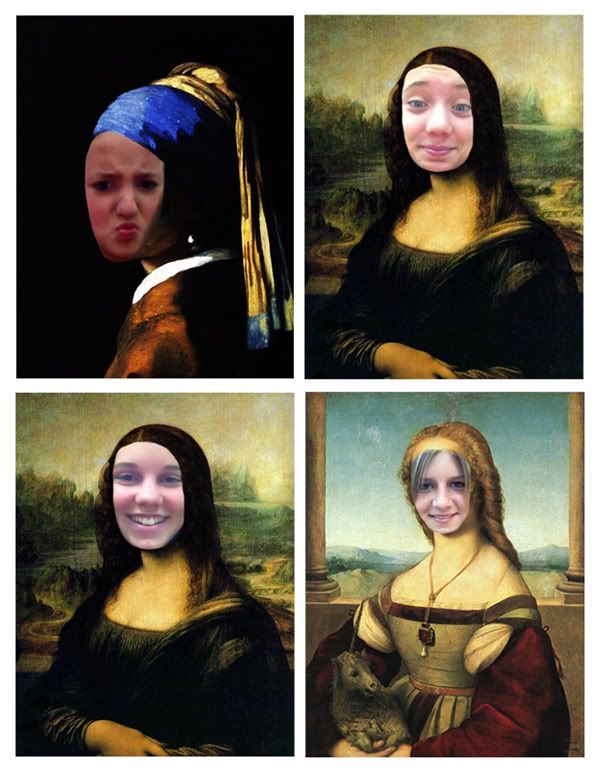
Last week, I gave the art room iPads to a few eighth grade students who finished their work early. One of the apps we had a ton of fun playing with is called "Masterpiece Me!" and you get to put your photo into a famous work of art! Here's a little gallery of some of the photos that were made:
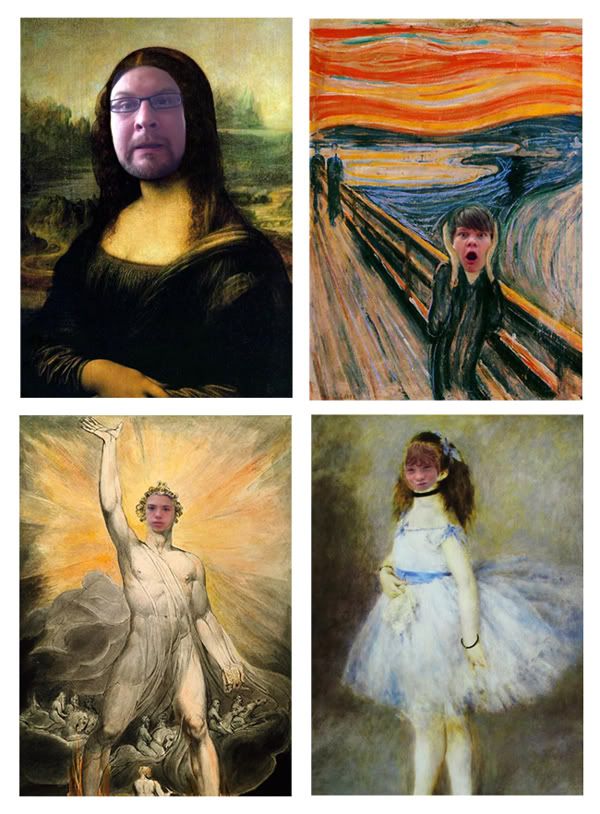
Can you spot Mr. Leban as the Mona Lisa in the photos above?
9.02.2011
Art Room 2011-2012!
For my first full "official" post this year, I thought I'd do a little photo update of the art room to show you how it's laid out, and what's new...
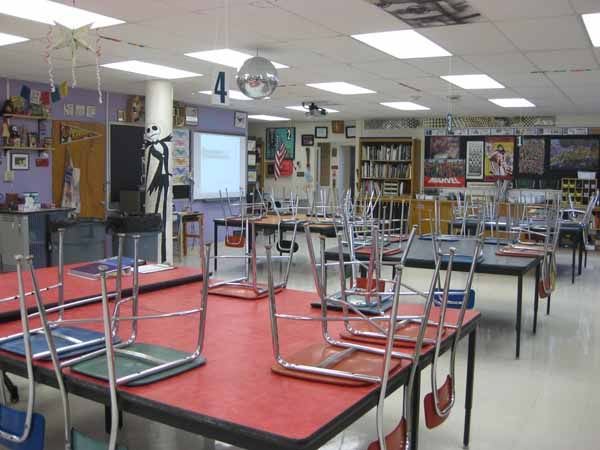
Above is an overview/wider shot from the back of the room (by my desk) to the front. My screen (which is now a SMARTboard!) has been relocated to an actual wall where we can walk up to it. Last year, the screen was in front of the windows on the opposite wall.
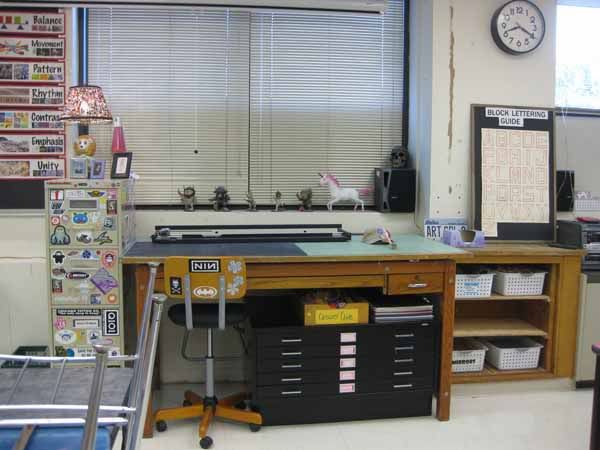
In this shot, you can actually see part of the old roll-up screen hanging above the windows. I relocated the big drafting desk to this wall, along with my favorite tall filing cabinet covered in my sticker collection. The wall with the clock used to house all the AV equipment that now is over by the SMARTboard, so I'm right now int he process of patching and painting the wall. I think I'll pick something really fun, color-wise. Stay tuned.
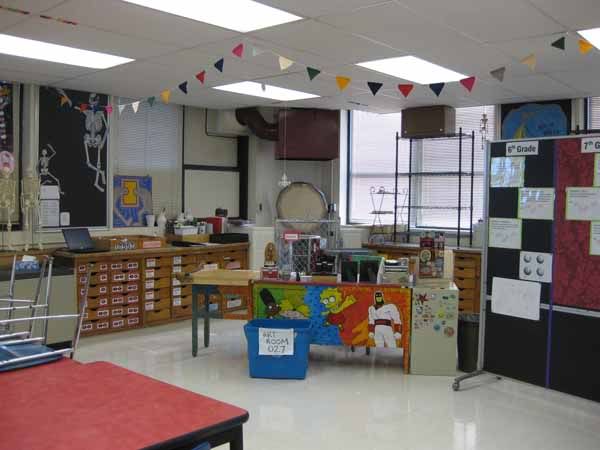
Here's a shot of my relocated desk. I put it in front of the kiln, which is nice because it's extra-safe away from students' hands (we've never had issues in the past, but still!) and also keeps clay projects farther from passer-bys. Clay projects are stored on the tall black wire shelves you see on the right side of the photo. You can also see part of the rolling bulletin/chalk board in this photo. That changes location ALL the time!
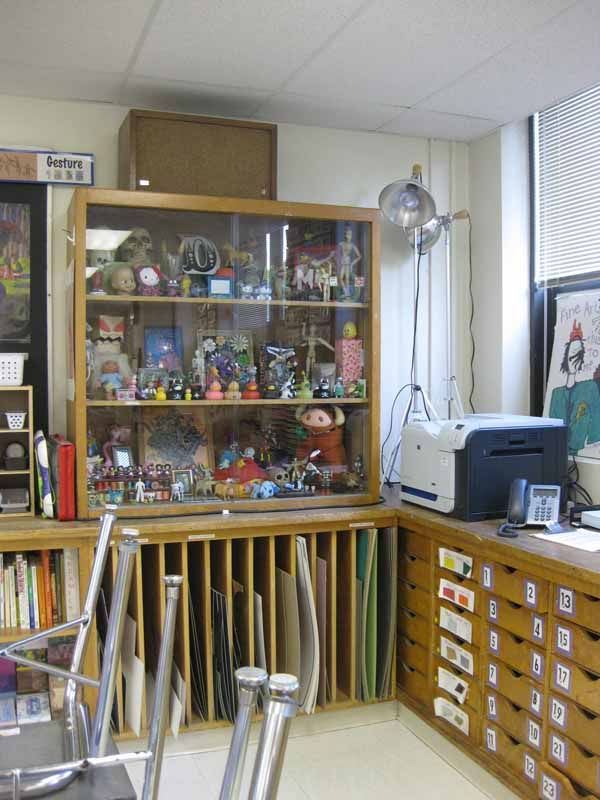
The toy cabinet! I collect lots of things, which actually can come in quite handy when you have a case of artist's block, or need inspiration for still-life objects. I put a lock on it to discourage "borrowing" of my favorite things, like tiny skeleton mariachis and my robot pencil sharpener. Wouldn't want those to get lost anywhere! But the glass makes viewing for sketching purposes very very easy.
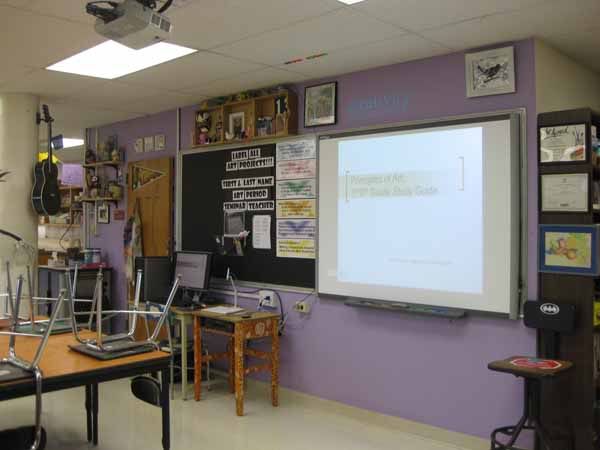
Last but not least... the SMARTboard! I'm so excited about using it this year, I even took a class on how to use it over the summer. Sixth graders are already familiar with the technology because some of them had one in their fifth grade classroom - how lucky!
I'm just now getting it set up "just right." I have a desktop PC connected to the board, along with my iPevo document camera/webcam. I also recently purchased a wireless tablet which will be connected to the PC, and will allow me to control the screen from far away, while students can walk up and use the touch screen. I LOVE being able to teach "on the fly" with so much information and easy-to-use technology at our fingertips - literally!
Have a great long Labor Day weekend everyone - I hope to start posting more regularly now that the room is 95% done, and classes are getting into the swing of things!
Above is an overview/wider shot from the back of the room (by my desk) to the front. My screen (which is now a SMARTboard!) has been relocated to an actual wall where we can walk up to it. Last year, the screen was in front of the windows on the opposite wall.
In this shot, you can actually see part of the old roll-up screen hanging above the windows. I relocated the big drafting desk to this wall, along with my favorite tall filing cabinet covered in my sticker collection. The wall with the clock used to house all the AV equipment that now is over by the SMARTboard, so I'm right now int he process of patching and painting the wall. I think I'll pick something really fun, color-wise. Stay tuned.
Here's a shot of my relocated desk. I put it in front of the kiln, which is nice because it's extra-safe away from students' hands (we've never had issues in the past, but still!) and also keeps clay projects farther from passer-bys. Clay projects are stored on the tall black wire shelves you see on the right side of the photo. You can also see part of the rolling bulletin/chalk board in this photo. That changes location ALL the time!
The toy cabinet! I collect lots of things, which actually can come in quite handy when you have a case of artist's block, or need inspiration for still-life objects. I put a lock on it to discourage "borrowing" of my favorite things, like tiny skeleton mariachis and my robot pencil sharpener. Wouldn't want those to get lost anywhere! But the glass makes viewing for sketching purposes very very easy.
Last but not least... the SMARTboard! I'm so excited about using it this year, I even took a class on how to use it over the summer. Sixth graders are already familiar with the technology because some of them had one in their fifth grade classroom - how lucky!
I'm just now getting it set up "just right." I have a desktop PC connected to the board, along with my iPevo document camera/webcam. I also recently purchased a wireless tablet which will be connected to the PC, and will allow me to control the screen from far away, while students can walk up and use the touch screen. I LOVE being able to teach "on the fly" with so much information and easy-to-use technology at our fingertips - literally!
Have a great long Labor Day weekend everyone - I hope to start posting more regularly now that the room is 95% done, and classes are getting into the swing of things!
5.06.2011
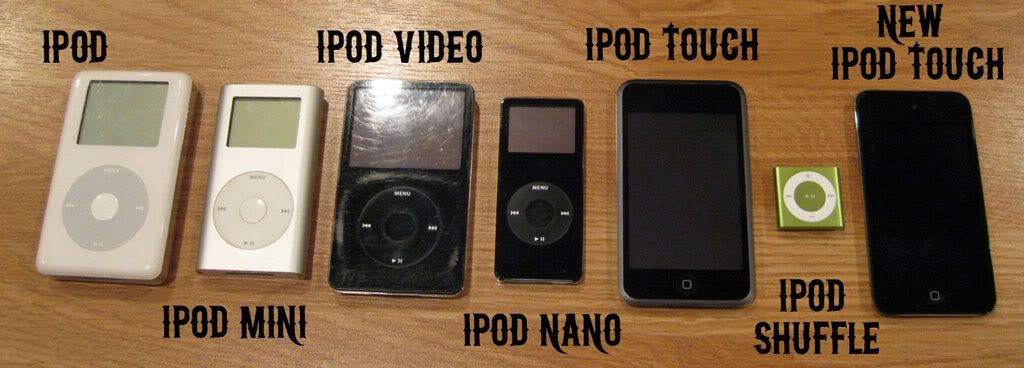
iPod Evolution
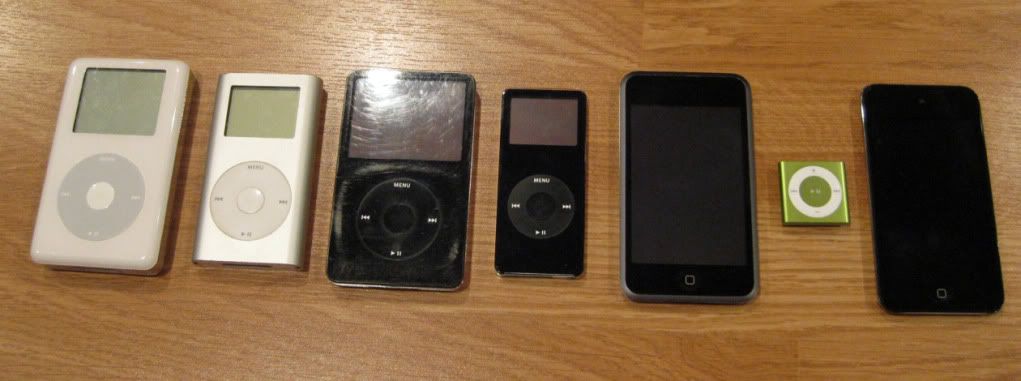
Mr. Leban had an idea the other day to line up our iPods, all in a row, and to photograph them. It's so interesting to see how the iPod has evolved, and to remember when we owned them, and why they were replaced...
When I use my iPod mini (yes, it still works and I still use it!) in my classroom, the students laugh at it and call it an antique! The black and white screen, the heavy metal wrapper... how I loved this when it was new! I bought it for myself as a birthday present. Not too long after, the first iPod nano came out, Mr. Leban bought it for me the following birthday.
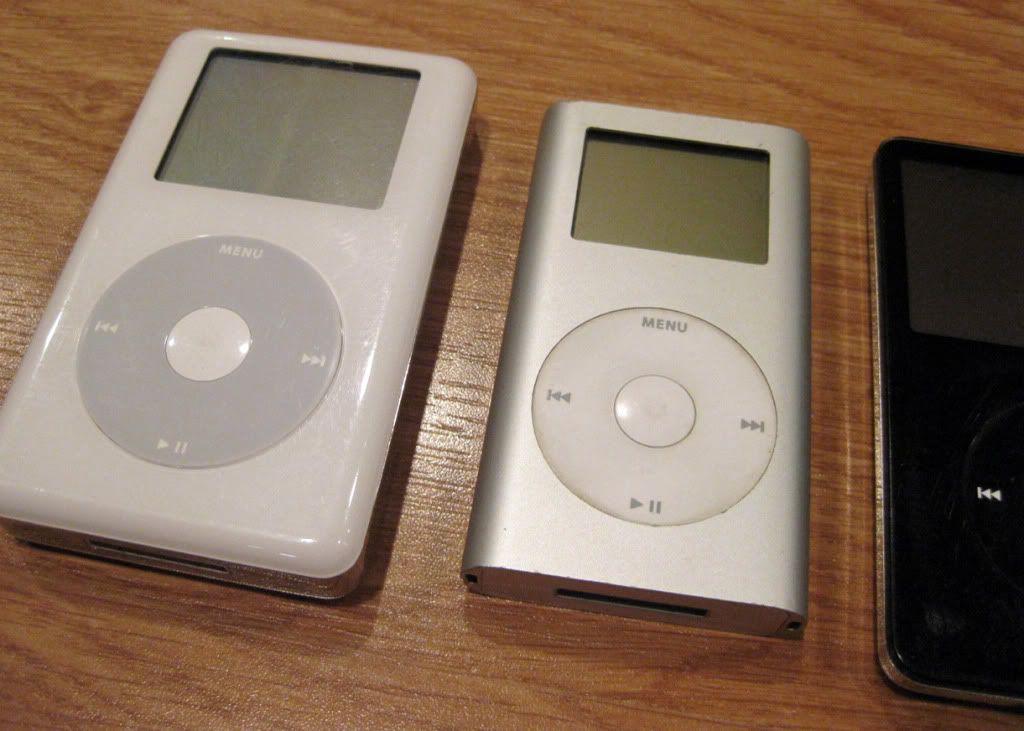
The original iPod and iPod video are both Mr. Leban's. I remember how impressed I was when I first saw how the iPod video worked. Amazing how fast the technology progresses... it was only a little over five years ago!
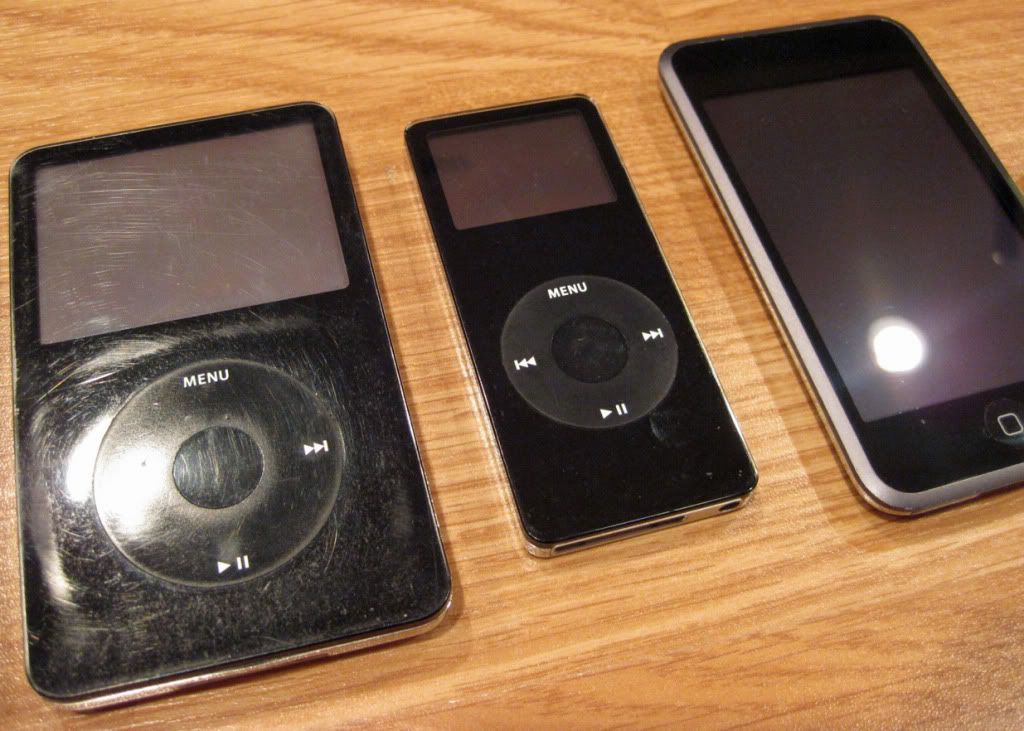
When our house finally decided to make the transition from PCs to Macs, we encountered (what we considered to be) a fantastic deal: a free iPod touch with the purchase of my new Mac book! We bought an additional iPod touch (so we each had one), but they were the first generation models. Once the second generation touches came out, it was near impossible to find a new case for the old ones, which was pretty frustrating.
Another fun fact is that the iPod touch did not originally come with the ability to download apps, and it was a system update that you had to purchase for $9.99 when the app store first opened up!
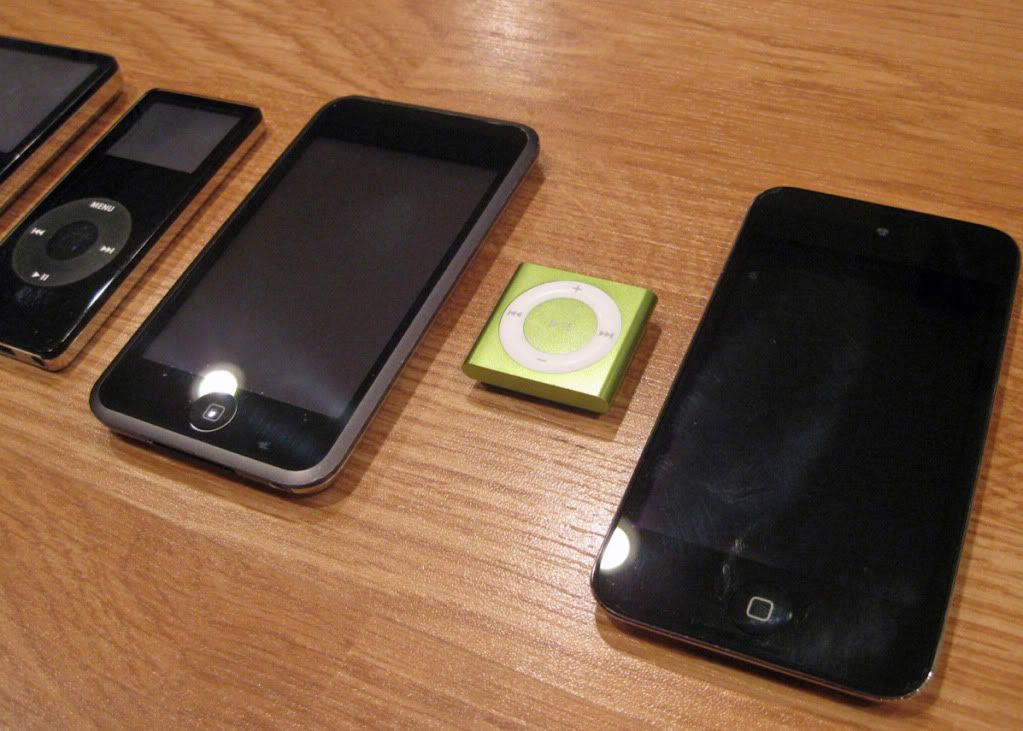
Mr. Leban won an iPod shuffle at a tech conference we went to a few months back. The most fun part about this model is a button you can press, and a little computer voice tells you the name of the song and the band. We like to try to pick obscure band names to see if it works right, but so far, it has! The best we've gotten are some mispronunciations, which are still pretty funny.
And just a few weeks ago, Mr. Leban decided to upgrade his old first gen iPod touch to a current model. Now, the question is, what do we do with all of these old ones? What do you do with your old technology?
4.28.2011
Technology Updates

I'd like to share a few quick updates with all of you. The first is that I changed (updated?) my Twitter name from "msmillerleban" to "mrsleban." I've been married almost two years now, so I figure most of my students are probably more familiar with me as Mrs. Leban instead of Ms. Miller. So if you already follow me and noticed this, that's why. On the flip side, maybe you're looking for me on Twitter and can't find me. This might also be why!

Secondly, the art blog is now optimized for viewing on your mobile phone! Here's a screen shot of it from my iPhone (above). When you use Blogger in draft, you have the option to make your site mobile-phone friendly. I thought I'd try it out. Let me know what you think!
4.20.2011
Tagxedo
Tagxedo is, in my opinion, a souped-up version of Wordle. It takes words from pretty much anything (rss feeds, twitter, famous speeches, urls, etc) and turns them into word "clouds" with more frequently used words showing up larger.
Tagxedo is cool because you can change most of the options, including the shape of the final cloud! Here, I made a Tagxedo from the Sandburg Art Blog:

Aww, I made it a heart shape, because I love art! It is easy to save and print your Tagxedo without having to create any logins or users (which is really important to me when I'm working with students). This site was really fun to play around with, and I hope to use it with students very soon as part of a cool new project!
Tagxedo is cool because you can change most of the options, including the shape of the final cloud! Here, I made a Tagxedo from the Sandburg Art Blog:

Aww, I made it a heart shape, because I love art! It is easy to save and print your Tagxedo without having to create any logins or users (which is really important to me when I'm working with students). This site was really fun to play around with, and I hope to use it with students very soon as part of a cool new project!
4.19.2011
Help fund our Donors Choose project!
While I was fortunate enough to benefit from Mrs. Bensfield's "Crochet Coral Reef" Donors Choose project, I've never actually tried to fund my own Donors Choose proposal... until now.
I've been researching wireless graphics tablets for a while now, and my original plan was to go out and buy one for the art room, probably with my own money, to use for presenting information to class, but also to collaborate and pass it around to students to draw with on the computer.
...so you can probably imagine my dismay when I discovered that a decent wireless tablet costs almost $400! I'd really like the Wacom Intuos4 Wireless tablet because I've heard really good reviews about it.
 So pretty!
My proposal is on Donors Choose right now, and it's called "Drawing Through The Air? Yes You Can!" Here's my plan:
A wireless graphics tablet would enable greater control and ease in presenting information to classes, both by the teacher and by the students. We can use the tablet to control presentations (such as PowerPoint and Prezi), and to annotate the computer screen while watching up on the projector as a whole class.
Another motivating and fun use of a wireless graphics tablet is to collaborate on a single drawing by passing the tablet around at our seats, with each student taking a turn adding to the final digital image.
A wireless graphics tablet is a useful tech tool for both the teacher and the students in the art room. It is an piece of equipment that will be used for many years to come, and will give students a "taste" of what it's like to use professional artist's tools.
Thanks in advance for your support! Please tell your friends!
I've been researching wireless graphics tablets for a while now, and my original plan was to go out and buy one for the art room, probably with my own money, to use for presenting information to class, but also to collaborate and pass it around to students to draw with on the computer.
...so you can probably imagine my dismay when I discovered that a decent wireless tablet costs almost $400! I'd really like the Wacom Intuos4 Wireless tablet because I've heard really good reviews about it.

My proposal is on Donors Choose right now, and it's called "Drawing Through The Air? Yes You Can!" Here's my plan:
A wireless graphics tablet would enable greater control and ease in presenting information to classes, both by the teacher and by the students. We can use the tablet to control presentations (such as PowerPoint and Prezi), and to annotate the computer screen while watching up on the projector as a whole class.
Another motivating and fun use of a wireless graphics tablet is to collaborate on a single drawing by passing the tablet around at our seats, with each student taking a turn adding to the final digital image.
A wireless graphics tablet is a useful tech tool for both the teacher and the students in the art room. It is an piece of equipment that will be used for many years to come, and will give students a "taste" of what it's like to use professional artist's tools.
Thanks in advance for your support! Please tell your friends!
4.13.2011
Hooray! I won stuff!

Exciting news! Today I was visited by members of the Elmhurst 205 Foundation, and they awarded me with a super amazing huge grant!
I wrote a grant for a SMART Board and three iPads to use in the art room, and I was so happy and excited to find out that I had won! It felt like winning the lottery! I had almost forgotten about writing the grant, since it was way back in December. My sixth graders were walking into the class as photos were being taken, so they were invited to take a photo of me and Principal Read along with our sign. I'll post a photo here if I get a copy, because I bet it turned out pretty good.
I hope to order the new technology soon, but it won't be fully up and running until next school year. Some of my current eighth graders were a little sad, but I promised they could try out the iPads if they show up before the summer.
Hooray! I love exciting news!
3.02.2011
a new video!
I just finished making a new video! I was trying to find a short YouTube clip to show 8th grade prior to using plaster craft that illustrates how it's used. Unfortunately, I couldn't find anything that fit our needs... so I made my own! I borrowed a flip video camera from Mrs. Lazzaro and put it on a tripod. As we made our own plaster hands, we filmed it, and I edited it down into what you see below. In making this video, I learned how to "speed up" the film so you could see a longer project happen over a short time.
Now, students who use plaster in future classes can see how we did it before they get their hands all dirty! Seeing the process makes planning your own project a lot easier, because you know what to expect when working with the material.
Hope you enjoyed our video!
Now, students who use plaster in future classes can see how we did it before they get their hands all dirty! Seeing the process makes planning your own project a lot easier, because you know what to expect when working with the material.
Hope you enjoyed our video!
2.18.2011
Graffiti Creator

I had a ton of fun yesterday messing around with the Graffiti Creator website. I'm going to try to make a sign for outside the art room. I know a few seventh grade boys have been having a lot of fun drawing in a graffiti style, so this website seems like it'd be right up a middle school student's alley!
2.10.2011
Google Art Project
For many "art" people, this is already old news, but for Sandburg Art students, this is a truly awesome new art website to check out!

Have you checked out the Google Art Project yet? You can tour art galleries at museums around the globe using Google's street-view technology to virtually walk around the room. You can also choose specific artworks (such as Van Gogh's Starry Night) to zoom in and out of, catching every little detail! I was shocked at how much you can actually see - right down to the cracks in the paint!
I've also started a "collection" in Google Art Project. You can visit my collection, simply entitled "Stuff I Like." As I grow more comfortable with the site, I can begin to build collections tied to projects we complete in class, but for now, it's fun to save things that look interesting to come back and look at later.
For more info on Google Art Project, check out the visitor's guide, with a neat behind-the-scenes video!

Have you checked out the Google Art Project yet? You can tour art galleries at museums around the globe using Google's street-view technology to virtually walk around the room. You can also choose specific artworks (such as Van Gogh's Starry Night) to zoom in and out of, catching every little detail! I was shocked at how much you can actually see - right down to the cracks in the paint!
I've also started a "collection" in Google Art Project. You can visit my collection, simply entitled "Stuff I Like." As I grow more comfortable with the site, I can begin to build collections tied to projects we complete in class, but for now, it's fun to save things that look interesting to come back and look at later.
For more info on Google Art Project, check out the visitor's guide, with a neat behind-the-scenes video!
1.14.2011
WIN a Nintendo DSi XL!
I love Scholastic Art Magazine. We have a subscription here at Sandburg, and we love reading the articles to learn about art from the past, as well as contemporary art. We then use our knowledge as inspiration for our projects here at school!
I remember reading Scholastic magazines when I was in school, and I always loved them. The information was written in a language that I understood - the articles weren't too "easy" or babyish, but also not too hard to read!
The latest issue of Scholastic Art is all about masks. The magazine is running a contest to design a mask, and you can win an awesome prize: a Nintendo DSi XL system and a copy of the game Art Academy!

I did some research on Art Academy, and it looks pretty cool. The game teaches you different drawing techniques to make you a better artist! You use your DS stylus as a pencil or brush to create images. When you're done with all the lessons, you can still use the "free paint" mode to create masterpieces of your very own!
Have any of you played Art Academy yet? I think I might have to go pick up my own copy to try it out!
There will be THREE winners of this contest! The deadline for the contest is February 28, 2011, so don't delay! Here's the link to the contest, with all necessary entry forms and rules. Good luck!
I remember reading Scholastic magazines when I was in school, and I always loved them. The information was written in a language that I understood - the articles weren't too "easy" or babyish, but also not too hard to read!
The latest issue of Scholastic Art is all about masks. The magazine is running a contest to design a mask, and you can win an awesome prize: a Nintendo DSi XL system and a copy of the game Art Academy!

I did some research on Art Academy, and it looks pretty cool. The game teaches you different drawing techniques to make you a better artist! You use your DS stylus as a pencil or brush to create images. When you're done with all the lessons, you can still use the "free paint" mode to create masterpieces of your very own!
Have any of you played Art Academy yet? I think I might have to go pick up my own copy to try it out!
There will be THREE winners of this contest! The deadline for the contest is February 28, 2011, so don't delay! Here's the link to the contest, with all necessary entry forms and rules. Good luck!
1.07.2011
BIG messes all in the name of making ART!

Eighth grade students spent their first week back from winter break making marbled paper using a shaving cream and food-coloring technique. The process is EXTREMELY messy, as you can see from our photos here. I had fun photographing everyone as they smiled for the camera with shaving cream hands.

Our marbled paper pieces will be used in a paper sculpture project. We're making star lanterns that will hang from the ceiling! I also had fun taking some photos with my Christmas present: a Fujifim Instax camera. It's like a mini-polaroid camera that takes photos like these:
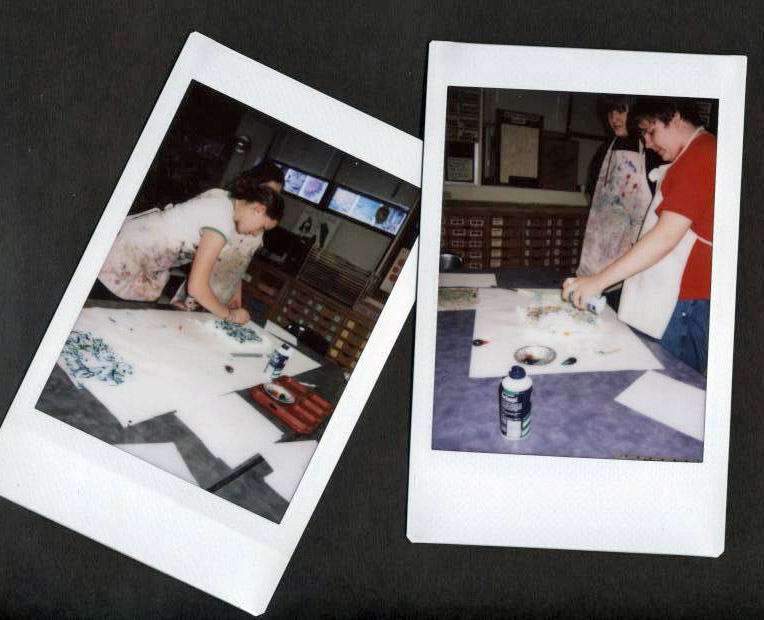
I love the super fun size of these mini photos! Plus, the camera is a really cute rounded shape. I love functional objects with interesting design, so it's no surprise that this camera appealed to me.
Did you get any good gifts over winter break?
12.02.2010
QR Codes
Mr. Leban has been doing a lot of stuff with QR codes lately, so I feel like I'm not doing my part if I don't try it out myself. If you have a smart phone (such as an iPhone) you can download an app that allows you to scan and read these little square jumbly pictures - otherwise known as QR codes. I read that QR codes are Japanese-created bar codes, and that the QR stands for "quick response"
I made one for the art blog here that takes you to the Sandburg Art home page:
 They're surprisingly easy to use. Just hold up your camera on your phone to the code (yep you can do it right here on the computer screen) and the app "reads" the information contained within the code. Sometimes it's just text, other times it's a link to a website or video or something else! (FYI - I use a free app on my iPhone called "i-nigma" if you're looking for which to use)
Mr. Leban and I are always on the lookout for QR codes. We even found one on the back of a tag from a packaged tiny eraser - it took us to the website of the manufacturer! Even though the website was in another language, it was neat to see how a company might use QR codes to get people to interact with their products more.

This year, Sephora used QR codes in their holiday catalogs! Next to photos of products to buy, there were QR codes that (when scanned on your phone) take you to how-to videos or short commercials for the products. I had a ton of fun interacting with the catalog when it arrived in the mail.
Have you spotted QR codes anywhere?
I made one for the art blog here that takes you to the Sandburg Art home page:

Mr. Leban and I are always on the lookout for QR codes. We even found one on the back of a tag from a packaged tiny eraser - it took us to the website of the manufacturer! Even though the website was in another language, it was neat to see how a company might use QR codes to get people to interact with their products more.

This year, Sephora used QR codes in their holiday catalogs! Next to photos of products to buy, there were QR codes that (when scanned on your phone) take you to how-to videos or short commercials for the products. I had a ton of fun interacting with the catalog when it arrived in the mail.
Have you spotted QR codes anywhere?
Subscribe to:
Posts (Atom)
